

Blogger
2 articles in this category
-
Prasyarat Akun Google & blog Blogger yang sudah dibuat Akses ke Tema → Edit HTML di dashboard Blogger Browser (disarankan Chrome/Firefox) Semangat belajar Cara Mengganti Template di Blogger Login ke blogger.com Pilih blog Anda → klik Tema di menu kiri Klik tombol Edit HTML (ikon pensil) Hapus semua kode yang ada Tempel kode baru dari tutorial ini Klik Simpan tema Buka blog Anda di tab baru untuk melihat hasilnya Tahap 1 — Kerangka Dasar (Hanya Tulang) Kita mulai dari kerangka pali
- Begini cara saya membuat template blogger mulai dari nol. Anda tertarik? Silahkan ikuti langkah-langkahnya. Copy-paste saja setiap tahap untuk melihat perubahannya.
-
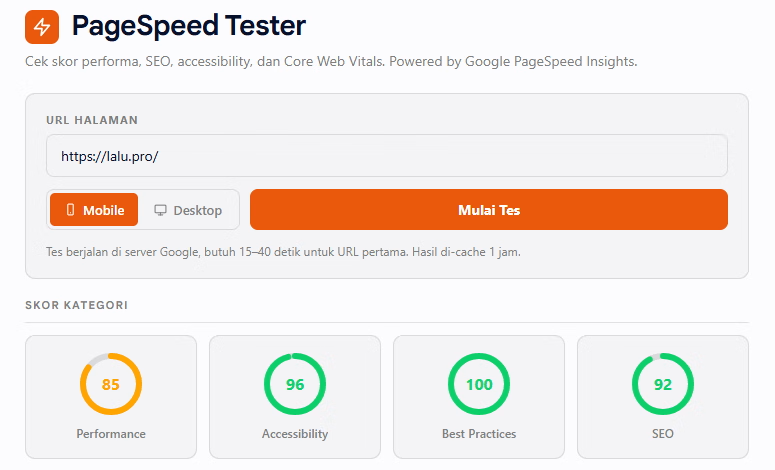
Tutorial lengkap membuat tool PageSpeed Tester yang aman dan gratis untuk blog Blogger Anda. Tool ini menggunakan Google PageSpeed Insights API dengan Cloudflare Worker sebagai proxy untuk menyembunyikan API key. Apa yang Akan Anda Buat Tool yang bisa: Cek skor Performance, Accessibility, Best Practices, dan SEO halaman manapun Tampilkan Core Web Vitals (FCP, LCP, TBT, CLS, dll) Berikan rekomendasi perbaikan diurutkan berdasarkan impact Cache hasil 1 jam untuk hemat quota 100% gratis (Google
- Tutorial lengkap membuat PageSpeed Tester di Blogger, bisa Cek skor performa, SEO, accessibility, dan Core Web Vitals. Powered by Google PageSpeed Insights.